
Download StayFocusd – Chrome extension to block distractions and boost productivity
Overview & Core Features
StayFocusd is a free, lightweight Chrome extension designed to help you break the habit of endless web‑surfing and reclaim valuable time. By allowing you to set strict limits on the amount of time you can spend on selected “time‑wasting” sites, the extension creates a digital guardrail that nudges you back toward focused work. Whether you’re a student juggling research, a freelancer fighting the lure of social media, or a professional trying to meet tight deadlines, StayFocusd offers a simple yet powerful way to stay on task without requiring a complete overhaul of your browsing habits.
Key Features
- Time Allocation Controls: Define a daily allowance (in minutes) for each distracting website or a total limit for all blocked sites.
- Strict Blocking Mode: Once the allotted time is exhausted, the extension redirects the site to a “Blocked” page, preventing further access for the rest of the day.
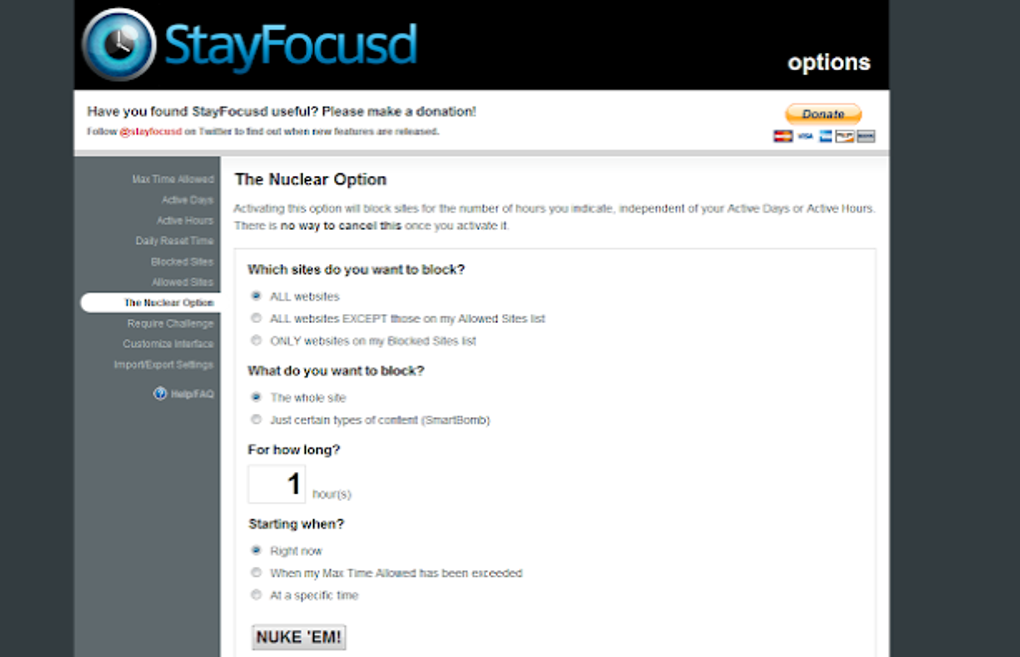
- Challenge Confirmation: Changing any restriction triggers a pop‑up challenge (e.g., a simple math problem) that discourages impulsive bypass attempts.
- Whitelist & Blacklist Management: Easily add essential sites to a whitelist, or bulk‑import a blacklist of known distractions.
- Customizable Active Hours: Schedule focus periods (e.g., 9 am‑5 pm) during which restrictions are enforced, allowing free browsing after work.
- Data‑Driven Insights: View a daily/weekly summary of blocked time, helping you track productivity gains over time.
- Secure & Private: All settings are stored locally in your Chrome profile; no personal data is transmitted to external servers.
Installation, Setup & Daily Usage
Getting StayFocusd up and running is a breeze, even for users who are not technically inclined. Follow these steps to install the extension, configure your focus parameters, and integrate it seamlessly into your daily workflow.
Step‑by‑Step Installation
- Open the Chrome Web Store and search for “StayFocusd”.
- Click the Add to Chrome button and confirm the permission prompt.
- After installation, a small red “S” icon appears in the Chrome toolbar, indicating the extension is active.
Initial Configuration
When you click the icon for the first time, a welcome screen guides you through a quick setup wizard:
- Set Your Daily Limit: Choose a total number of minutes you want to allocate to distracting sites (e.g., 30 min).
- Select Websites to Block: Add URLs such as facebook.com, youtube.com, or any site you find habit‑forming.
- Define Active Hours: Enable “Focus Mode” during your most productive periods. Outside those hours, the extension remains idle.
- Enable Challenge Confirmation: Turn on the optional challenge to make it harder to alter limits mid‑day.
Daily Use & Adjustments
Once configured, StayFocusd works silently in the background. When you approach your allotted time on a blocked site, a countdown appears, warning you of the impending lockout. If you exceed the limit, the extension redirects you to a customizable “Blocked” page, reminding you of your commitment. Should you need to make an exception (e.g., a work‑related research session), you can temporarily lift a block via the toolbar menu, but only after solving the challenge—this extra step reinforces discipline.
Troubleshooting Common Issues
If a site seems to bypass the block, verify that the URL is entered correctly (including subdomains). Some sites use multiple domains (e.g., m.youtube.com); adding each variation ensures comprehensive coverage. For users who employ incognito mode, remember to enable the extension for private browsing via Chrome’s extension settings.
Compatibility, Pros & Cons, and Frequently Asked Questions
Compatibility: StayFocusd runs on any device that supports the Google Chrome browser, including Windows, macOS, Linux, Chrome OS, and mobile Chrome on Android and iOS (via Chrome for Android/iOS). Because it is a browser extension, there is no separate desktop or mobile app to install; the same settings sync automatically when you sign into Chrome and enable sync.
Pros
- Free and open‑source, with no hidden subscription fees.
- Highly customizable – you control time limits, blocked sites, and active hours.
- Challenge confirmation discourages impulsive changes, reinforcing self‑discipline.
- Lightweight footprint; it does not noticeably affect browser performance.
- Local data storage ensures privacy and security.
Cons
- Only works within Chrome; users of other browsers need a different solution.
- Advanced users can technically uninstall or disable the extension, though the challenge feature mitigates casual tampering.
- No built‑in “focus music” or ambient sound features—requires complementary apps for a full productivity suite.
FAQ – Your Questions Answered
Can I use StayFocusd on multiple computers?
Yes. As long as you are signed into the same Google account and have Chrome Sync enabled, your StayFocusd settings will sync across all devices where the extension is installed.
Is there a way to temporarily pause the block without changing my limits?
You can enable “Pause” from the extension’s toolbar menu. This pauses all restrictions for a user‑defined period (e.g., 10 minutes) and then automatically re‑activates the limits.
Does StayFocusd track which sites I visit?
The extension only records time spent on sites you have explicitly added to the block list. This data is stored locally and never transmitted to external servers, preserving your privacy.
Can I set different limits for weekdays and weekends?
Yes. StayFocusd allows you to create separate “profiles” with distinct time allocations and active hours for each day of the week, giving you flexibility for varying work schedules.
Is there a premium version with more features?
StayFocusd is fully functional as a free extension. The developer has not released a paid tier, which keeps the tool accessible to anyone who needs it.
Conclusion & Call to Action
In a world saturated with click‑bait and endless scroll, a simple yet effective tool like StayFocusd can make the difference between a productive day and a marathon of distractions. Its blend of granular time controls, challenge‑based safeguards, and seamless Chrome integration offers a low‑maintenance solution that respects both your privacy and your need for flexibility. While it is limited to the Chrome ecosystem, the extension’s robust feature set and zero‑cost model make it an essential addition to any digital productivity toolkit.
Ready to reclaim your focus? Download StayFocusd now and start setting smarter browsing limits today. Remember, the first step toward a more disciplined workflow is just a click away.
Pros:
- Free, no hidden fees.
- Highly customizable time limits.
- Challenge confirmation reduces cheating.
- Local data storage ensures privacy.
- Cross‑platform support via Chrome.
Cons:
- Only works in Chrome.
- Lacks built‑in focus music.
- Advanced users can disable it.







